Onewheel · iPhone
Record your Onewheel ride with speed, battery and map in the shot
Pair your board with AtlasCam over Bluetooth, and your iPhone films the ride with board battery, speed, riding mode and a route map on screen. Post a 15-second reel or keep the whole ride.
Get AtlasCam freeSet it up
-
Turn on board logging
Open AtlasCam’s Settings, find the Onewheel section and turn on Log board telemetry (Bluetooth).
-
Power on the board and open the camera
With the camera open, AtlasCam scans for your board, connects and remembers it for next time. Tap Connected devices in the top bar to check the board’s model and battery.
-
Unlock it if AtlasCam asks
If a “locked” banner appears, tap Open and let the Onewheel app connect once, then switch back. The board’s stats show up on their own. Riding a Pint S? It looks the same as a Pint X over Bluetooth, so choose it under Overlay model in Connected devices.
-
Mount the phone and ride
A chest mount gives the classic first-person view, and a handheld pole works for follow shots. Start recording before you set off. AtlasCam logs board stats, GPS speed, the route and altitude for the whole clip.
-
Make a reel or export the ride
Open the ride from the Library. Make Reel cuts a vertical clip around your fastest moment, and Edit layout & export lets you place the stats yourself and export the full clip.
Board stats you can show
These sit beside the usual speedometer, map, altitude and compass. The speedometer’s dial is scaled for board speeds, so it doesn’t look empty at 15 mph.
- BatteryCharge percentage, pack voltage and current draw.
- SpeedBoard speed from the motor, plus GPS speed from the phone.
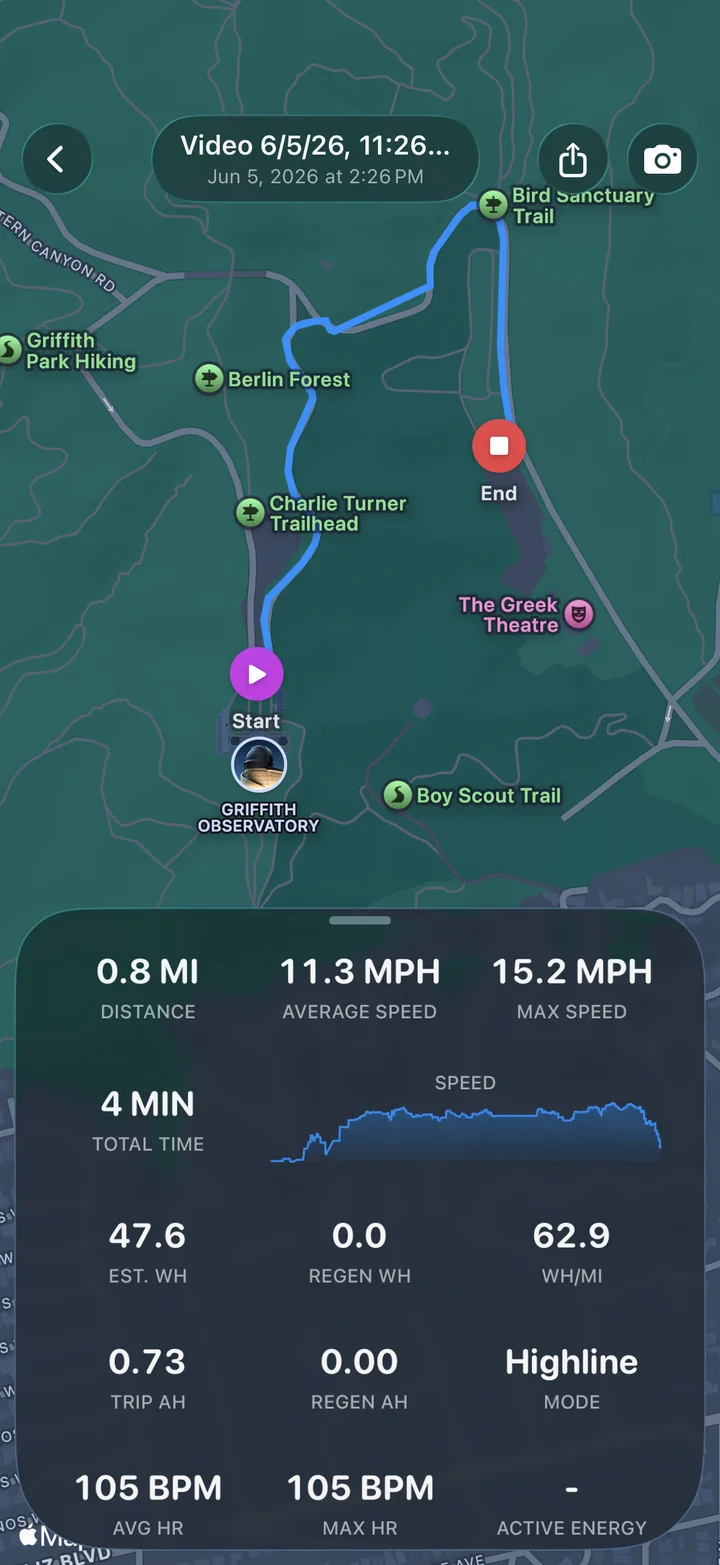
- Riding modeThe mode you’re riding in, such as Highline.
- DistanceTrip miles and the board’s lifetime odometer.
- EnergyAmp-hours used and regenerated, net watt-hours and energy per mile.
- TemperaturesController and battery temperatures, useful on long climbs and hot days.
Add the AtlasCam Apple Watch app and you can show live heart rate and calories too. With AtlasCam Pro you can pick exactly which board stats appear in an export.
Don’t want video? Log the ride anyway
For long group rides, switch to Telemetry mode. AtlasCam logs your route, elevation and board stats with the screen locked and the phone in your pocket, so the camera isn’t running down your battery.
Afterwards the ride is in your Library with its route on a map, distance, average and top speed, energy used, regen, watt-hours per mile, riding mode and heart rate.
Ride safely. Wear a helmet and set up your shot before you roll. Don’t look at the screen while riding. The stats are recorded either way, so you can check them after the ride.
Questions
Which Onewheel boards work with AtlasCam?
AtlasCam reads the Onewheel, Onewheel+, XR, Pint, Pint X, Pint S, GT and GT S-Series over Bluetooth. The GT, GT S-Series, Pint X and boards on newer firmware need a one-time unlock in the official Onewheel app before AtlasCam can read them. AtlasCam shows a banner with an Open button when that’s needed.
Does AtlasCam replace the Onewheel app?
No. AtlasCam only reads board stats for your recordings. Keep using the official Onewheel app for riding modes, settings and firmware updates.
Does it work with VESC boards?
Yes. Turn on board logging under VESC in Settings. VESC controllers don’t know your wheel size, so set pole pairs, wheel diameter and gear ratio in Connected devices to get accurate speed and distance.
Can I record without video to save battery?
Yes. Telemetry mode logs your route, elevation and board stats with the screen locked. You can review the ride in your Library afterwards.
Is it free?
Recording with board stats and exporting the clip are free, with a small “Shot on AtlasCam” badge on exports. AtlasCam Pro removes the badge and adds styling controls for $2.99 a month, $29.99 a year or $79.99 once. There’s a 7-day free trial that doesn’t ask for payment.
Onewheel is a trademark of Future Motion, Inc. AtlasCam reads boards over unofficial Bluetooth access and isn’t affiliated with or endorsed by Future Motion. Board support is based on community documentation of the Onewheel Bluetooth interface.