App Guide & Tutorial

Master everything you can do in AtlasCam.

From live viewfinder HUDs and Onewheel telemetry to one-tap reels, 3D relive flights, and live streaming β€” here is your complete field manual for the AtlasCam ecosystem.

Chapter 00

The 30-Second Rider Checklist

Get rolling in four quick steps. AtlasCam is built for fast starts at the curb so you spend time riding, not digging through menus.

1

Choose Mode

Select Video for 4K action, Telemetry Ride to log routes in your pocket with the screen off, or Multi-Cam for front and rear capture.

2

Tune Your HUD

Tap the HUD gauge icon to cycle presets, or simply touch and drag any metric directly on the screen to place it wherever you want.

3

Record & Ride

Hit the Record button. AtlasCam locks in high-frequency GPS, syncs your Onewheel board and Apple Watch, and logs your elevation curve.

4

Make Reel

After your run, open the ride detail and tap Make Reel to instantly generate a 15-second vertical clip around your peak speed moment ready to post.

⚑️
Rider Tip: One-Handed Viewfinder Gesture

Press and hold anywhere on the live viewfinder with your thumb to instantly summon the overlay configuration drawer without reaching for the top bar.

Chapter 01

The Viewfinder & Capture Modes

AtlasCam adapts to how you move. Whether you want high-framerate action video, battery-friendly pocket logging, or spatial 3D LiDAR scans, switch modes directly above the shutter.

πŸŽ₯
Free Mode Switch

Action Video Recording

Capture cinematic ride footage with synchronized telemetry locked into every frame. Tuned specifically for vibration resilience and fast orientation transitions.

  • Up to 4K resolution at 60 fps with enhanced stabilization
  • Instant lens switching (0.5x Ultra-Wide, 1x Wide, Telephoto)
  • Exposure lock and torch toggle for night runs and tunnels
πŸ”‹
Free Pocket Mode

Telemetry-Only Ride Mode

Log your complete route, board stats, and speed profile without running the camera sensor. Designed for long multi-hour group rides where phone battery is precious.

  • Keeps logging in your pocket with the screen off
  • Uses Apple Always location hold to prevent iOS suspension
  • Generates complete ride statistics and route maps
πŸ‘₯
Pro iPhone 13+

Multi-Cam Dual Recording

Record your reaction and the trail ahead simultaneously. AtlasCam taps into iOS multi-camera APIs to encode both front selfie and rear lenses in real time.

  • Picture-in-picture or split-screen framing
  • Synchronized audio and telemetry across both lenses
  • Thermal monitoring steps bitrate safely on hot days
🧊
Pro LiDAR Models

3D Spatial & LiDAR Capture

Turn supported iPhone Pro models into spatial scanning instruments. Visualize real-time depth maps, point clouds, and export Gaussian Splat proofs.

  • Metal-accelerated real-time depth mesh shaders
  • Obstacle and terrain depth distance readouts
  • Export 3D point cloud packages alongside ride stats
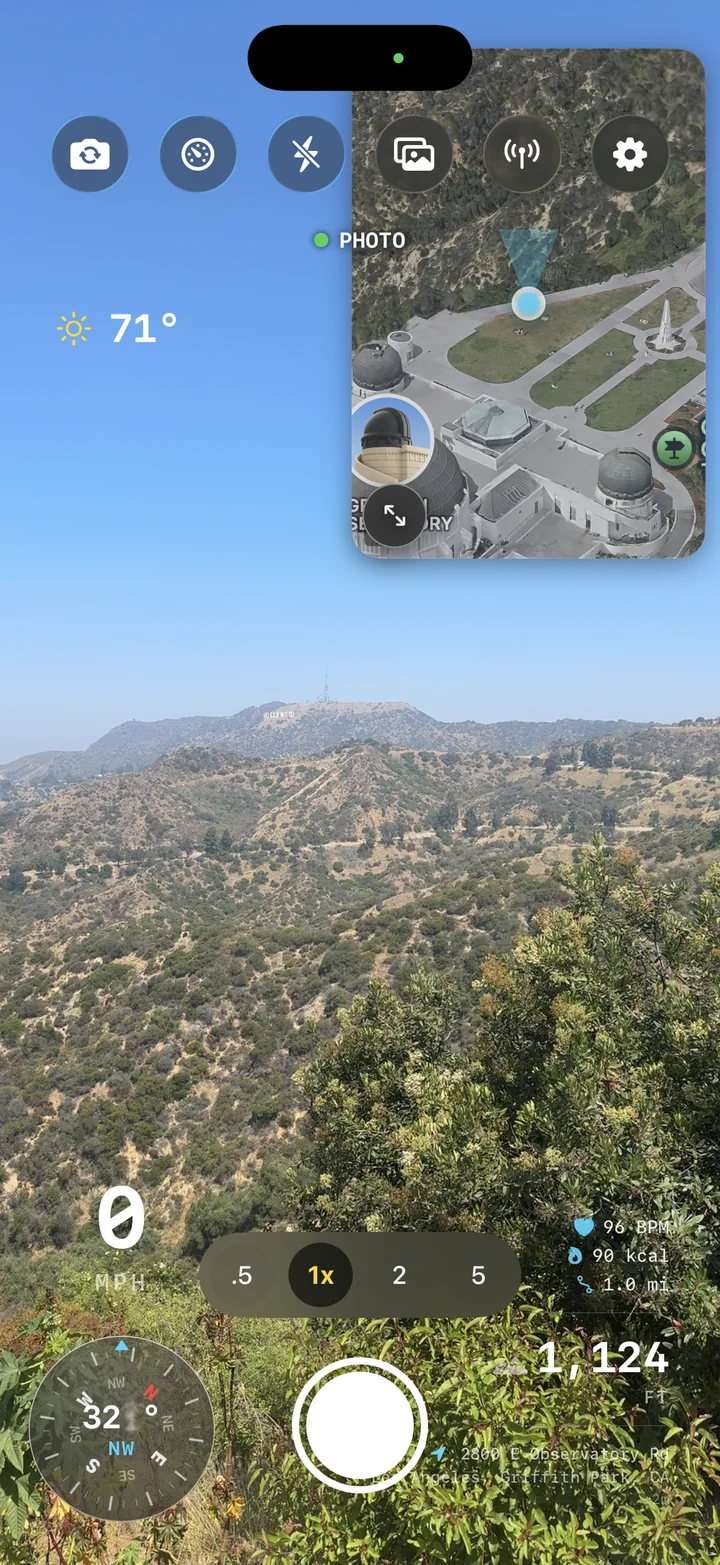
AtlasCam live camera screen overlooking Hollywood hills with zoom controls and telemetry overlays
πŸ’Ύ
External Storage: Plug & Record directly to USB-C SSDs

On iPhone 15 Pro and newer, connect an external USB-C drive (like a Samsung T7 or SanDisk Extreme). AtlasCam automatically detects external volumes and streams 4K ProRes/action video straight to the drive without consuming internal phone storage.

Chapter 02

The Telemetry HUD & Overlays

Data that belongs in the shot. AtlasCam overlays critical riding telemetry right on the viewfinder β€” and lets you reposition or restyle every single widget.

⚑️
Drag & Drop

Speedometer & Altimeter

Dynamic speed gauge calibrated in MPH or KM/H, paired with barometric elevation and vertical climb rate. Features subtle peak-speed flash indicators when setting new run records.

  • Toggle between digital readout and analog arc gauge
  • Live elevation change with grade incline percentage
  • High-contrast anti-glare typography for sunlight riding
🧭
Interactive

Mini-Map & Bearing Compass

An interactive inset route map showing your real-time GPS breadcrumb trail alongside a magnetic bearing compass heading.

  • Switch between Satellite, Hybrid, and Stylized Vector maps
  • Automatic track centering with dynamic speed-based zoom
  • Cardinal direction bearing and GPS coordinate stamp
⚾️
Unique

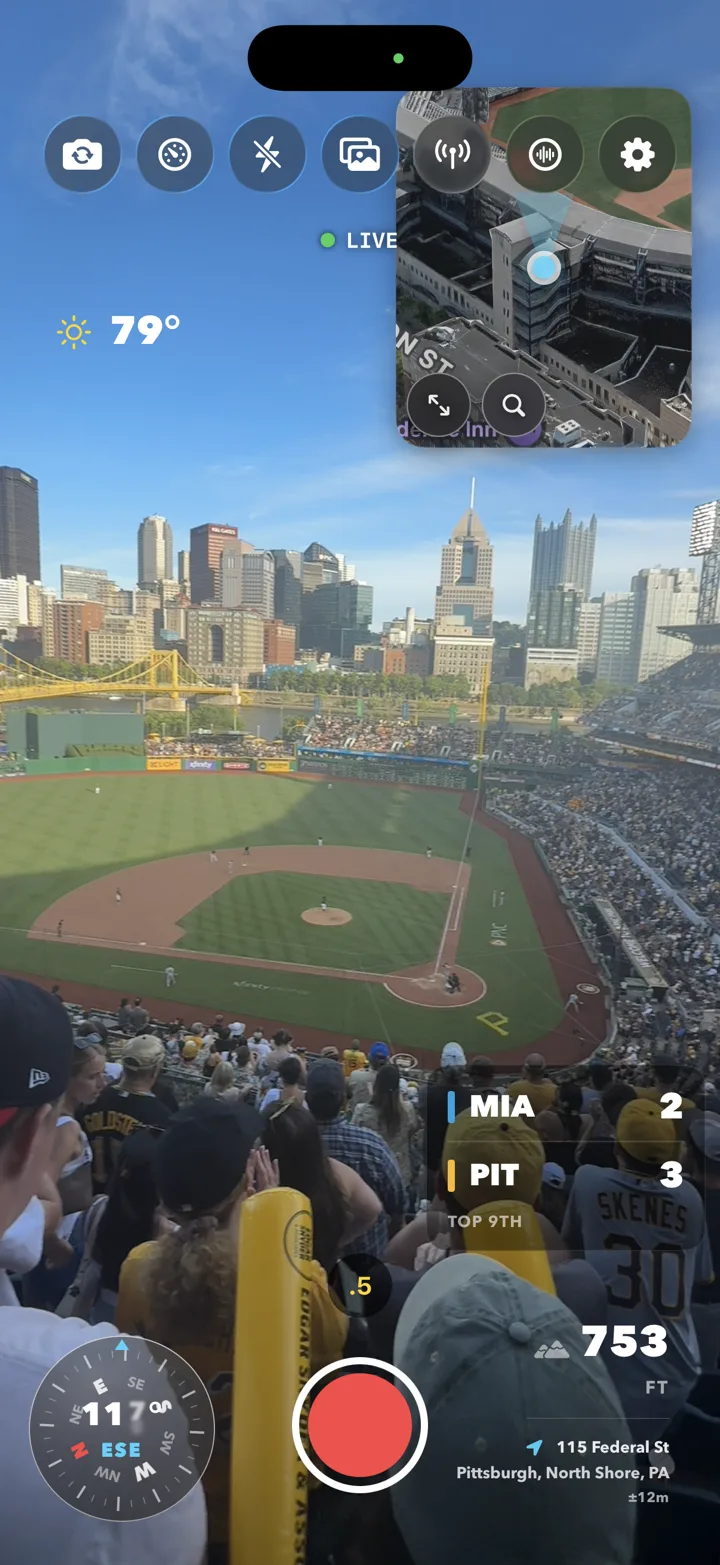
Live Sports Scorebug

Recording from the stands or cruising by a ballpark? AtlasCam detects the active game at your location and overlays live MLB scores, inning, count, and official team colors.

  • Automatic ballpark geo-detection or manual game picker
  • Real-time score updates, base runner dots, and outs
  • Bakes cleanly into exports alongside your speed and weather
🌀️
WeatherKit

Weather & Conditions Badge

Pulls local temperature, condition icons (sun, overcast, rain), humidity, and wind speed directly from Apple WeatherKit at your coordinate.

  • Keeps meteorological context attached to your video clips
  • Wind speed and gust direction for coastal and mountain runs
  • Compact badge format designed to stay unobtrusive
🎨
Long-Press

Interactive Drag & Drop Layout

Never get stuck with a rigid layout. Touch and drag any HUD overlay anywhere across the viewfinder. Where you leave it on screen is exactly where it burns into your export.

  • Drag widgets with magnetic snap guides to screen edges
  • Pinch to scale widget size up or down
  • One-tap reset to return to standard default layout
✨
Pro

Themes & Overlay Marketplace

Customize the visual aesthetic of your gauges. Choose from Top Gun Fighter Jet green, Cyberpunk Neon Cyan, Retro 80s Amber, Minimal Clean, or commemorative Holiday drops.

  • Glassmorphic glow effects and border thickness controls
  • Typography selections (Futura Condensed, Monospace, Inter)
  • Seasonal event badges (e.g. America 250 commemorative badge)
Ballpark & Action HUD

Data that matches the moment.

Whether you're bombing a canyon road at sunset or catching the bottom of the ninth at PNC Park, AtlasCam's overlays enrich the story without obstructing the action. Every widget is rendered as vector graphics for sharp, legible text at any resolution.

πŸ’‘
HUD Presets: One-Tap Cycling

Tap the HUD gauge icon on the top bar to instantly cycle between Minimal (speed only), Standard (speed, altitude, map), and Full Telemetry without opening settings.

AtlasCam live camera view from stands at a Pirates ballgame with live scorebug, weather, and compass
Chapter 03

Connected Gear & Bluetooth Telemetry

Connect directly to your hardware. AtlasCam communicates over Bluetooth Low Energy (BLE) with boards and wearables to put raw sensor diagnostics on your HUD.

πŸ›Ή
BLE Direct

Onewheel Board Telemetry

Connects directly to your Onewheel (GT S-Series, GT, Pint X, Pint, XR) without requiring third-party cloud bridges. Live board metrics appear directly on the viewfinder and in exported videos.

  • Real-time board battery percentage and pack voltage
  • Motor temperature, controller temperature, and battery amps
  • Active riding mode (Custom, Flow, Highline, Apex) and trip Ah
  • Pitch and roll tilt angles for carving and hill climbs
⌚️
watchOS

Apple Watch Companion & Heart Rate

Run the native AtlasCam Apple Watch app during your ride. Stream real-time biometric and workout data directly to your phone's HUD and record Apple Health workouts.

  • Live heart rate (BPM) overlay with color-coded heart zones
  • Active calorie burn, workout duration, and wrist speed view
  • Wrist haptics notify you when recording starts or stops
  • Watch face complication for instant one-tap session launches
πŸ“Ά
Bluetooth LE

Heart Straps & Cycling Sensors

Pair external standard Bluetooth fitness sensors including Polar, Garmin, and Wahoo chest straps or cadence monitors for cycling and downhill sessions.

  • Standard Bluetooth GATT cycling speed and cadence (CSC)
  • Standard Heart Rate Profile (HRP) chest strap support
  • Auto-reconnects when sensors wake up nearby
πŸ›Ή
How to Pair Your Onewheel:

Turn on your board, open AtlasCam, and tap the Antenna / Devices icon in the top bar. Tap "Scan for Devices", select your Onewheel from the list, and your battery percentage and ride mode will instantly light up on the HUD.

Chapter 04

AtlasCam Live & Broadcasting

Let friends follow your ride in real time. AtlasCam Live offers lightweight browser watch links, direct RTMP streaming to Twitch/YouTube, and local OBS overlays.

🌐
Pro No Account Needed

Ephemeral Watch Links

Tap "Go Live" to generate a short, private link (e.g. live.atlascam.app/k8f2m9). Friends and family open the link in any mobile or desktop browser to watch your live route and stats on a map.

  • Telemetry only: Extremely lightweight (~5 MB per hour)
  • Viewer browser renders its own vector map β€” zero video lag
  • Survives backgrounding: Keep the broadcast running with phone in pocket
πŸ›‘οΈ
Safety

Start/End Privacy Fuzzing

Broadcasting live GPS requires privacy protections. AtlasCam features built-in location fuzzing to protect your home and destination.

  • Configurable concealment radius (e.g. hide first and last 500 ft)
  • Map display only begins once you are outside your home radius
  • Links are unlisted by default and expire when your ride ends
🟣
Pro RTMP

Twitch & YouTube Live Streaming

Broadcast video directly to your own Twitch channel or YouTube Live ingest. AtlasCam burns the live HUD directly into the video stream in real time.

  • Direct Twitch OAuth login in Settings for 1-tap broadcasts
  • Hardware-accelerated 1080p30 H.264 video streaming
  • Adaptive bitrate steps down smoothly on cellular coverage changes
  • Standby card kicks in if camera is temporarily interrupted
πŸ–₯️
Pro LAN

OBS Studio Local Network HUD

Stream your phone camera into OBS on your Mac or PC? AtlasCam runs a lightweight HTTP server on your local Wi-Fi serving a transparent HTML HUD.

  • Add Browser Source: http://atlascam.local:8080/overlay
  • Zero-latency transparent telemetry graphics overlaid in OBS
  • Completely local on Wi-Fi β€” zero external server dependencies
Chapter 05

Hands-Free AI Voice Copilot

Never look down at your screen at 20 MPH. AtlasCam features an AI voice copilot tuned for riders wearing helmets and earbuds.

πŸ—£οΈ
Voice Trigger

Telemetry Voice Queries

Ask natural questions while carving down the road. Copilot inspects your live sensor log and speaks immediate audio answers through your AirPods or Cardo/Sena helmet communicator.

  • "What's my speed?" → Speaks current and top speed
  • "How much battery do I have left?" → Speaks Onewheel board % and estimated range
  • "What is my elevation?" → Reports altitude and vertical gain
🧭
Hands-Free

Route & Local Awareness

Need navigation or nearby points of interest without pulling out your phone? The copilot uses real-time map context to give quick voice guidance.

  • "Find the nearest coffee shop on my route"
  • "How far have I ridden today?"
  • "What trail am I currently on?"
πŸ”’
Privacy First & Bring-Your-Own-Key:

The AI Voice Copilot uses on-device speech detection. In Settings > Copilot, you can supply your own OpenAI API key stored securely in iOS Keychain. Audio is processed only when the copilot is actively queried.

Chapter 06

Rides Library, 3D Relive & TV Mode

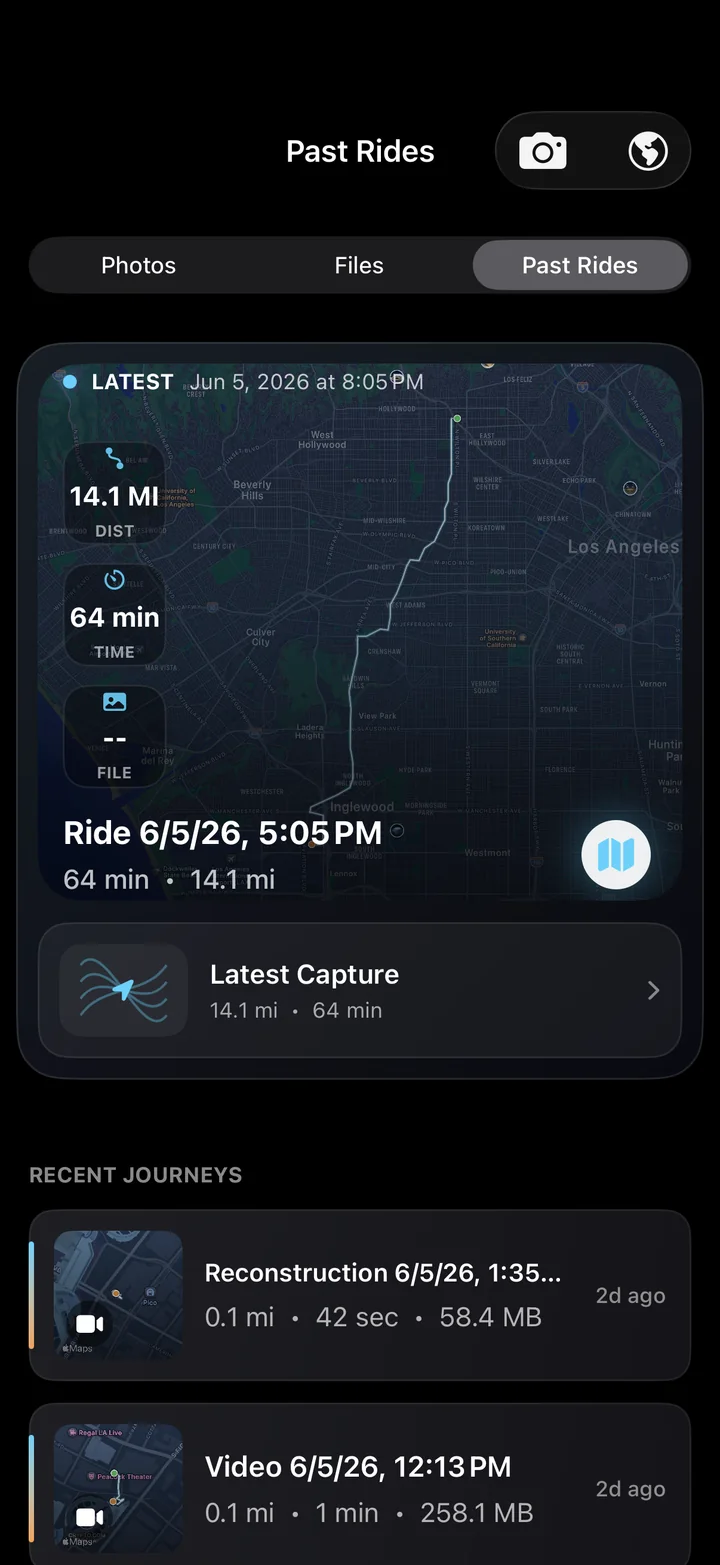
Every run saved as an interactive record. Relive the line from a 3D aerial perspective or beam it to the big screen in your living room.

🚁
Free

3D Aerial Route Relive

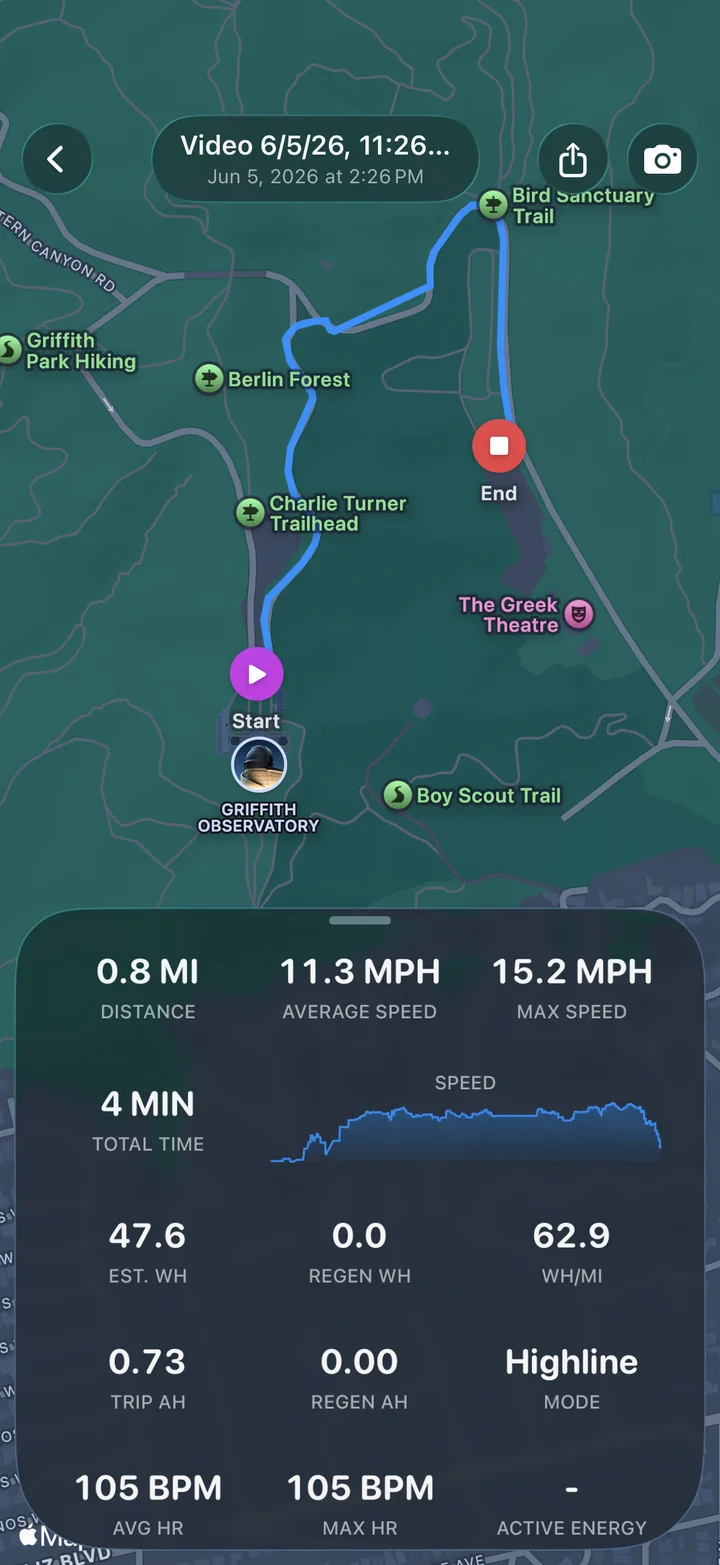
Fly over your route on an interactive 3D terrain map. An animated camera traces the turns, ascents, and descents you rode, fully synchronized with your video clips.

  • Interactive tilt, pan, and orbital camera controls
  • Speed graph scrub bar synced with map pointer
  • Highlights highest speed, max altitude, and total distance
πŸ—ΊοΈ
Free

All-Rides Exploration Map

Browse your complete riding history on a global map. See everywhere you have explored, filter by date or board, and jump into any historic session.

  • Global route heatmap showing all logged journeys
  • Quick search by city, trail name, or date
  • Aggregate stats: lifetime miles, total climb, top speed
πŸ“Ί
Pro AirPlay / HDMI

External Display TV Mode

Connect your iPhone to a TV via AirPlay or USB-C HDMI. AtlasCam renders a cinema-grade 4K relive experience on the big screen while your phone becomes a handheld remote.

  • Dedicated big-screen UI without phone chrome or buttons
  • Handheld scrub, play/pause, and camera angle remote on phone
  • Perfect for group post-ride debriefs and living room playback
AtlasCam Past Rides library with mapped ride record and recent journeys
Chapter 07

Make Reel & Social Exporting

Zero tedious editing required. Turn hours of raw footage into a punchy, telemetry-rich clip ready to post in five seconds.

⚑️
1-Tap

Algorithmic "Make Reel" Highlight

Open any recorded ride and tap Make Reel. AtlasCam automatically scans the telemetry timeline to locate your highest-speed, most dramatic 15-second segment.

  • Automatically centers the clip around peak speed moment
  • Pre-configured for 9:16 vertical social video (Reels, TikTok, Shorts)
  • Retains synchronized HUD gauges burned onto the video
πŸ“
Multi-Format

Flexible Aspect Ratios & Layouts

Export in whatever format your platform demands. The overlay layout engine automatically reflows telemetry gauges to match your chosen aspect ratio.

  • 9:16 Vertical: Instagram Reels, TikTok, YouTube Shorts
  • 1:1 Square: Instagram feed posts and previews
  • 16:9 Landscape: Full YouTube and desktop videos
  • Original: Uncropped camera sensor aspect
πŸ“¦
Open Data

Raw Data & GPX Export

Need your route for Strava, Garmin Connect, or custom video post-processing? Export standard files with one tap.

  • Export GPX and FIT track files with time-stamped elevation
  • Export raw JSON telemetry synchronized to video frame timestamps
  • Export clean raw video without overlays if you prefer clean footage
AtlasCam ride replay with route map, speed graph, ride stats, and Make Reel
#️⃣
Join the Community: #AtlasCamRide

When you export with Make Reel, AtlasCam includes an optional "Shot on AtlasCam" attribution badge. Tag your clips on Instagram or TikTok with #AtlasCamRide to be featured on our official channels and weekly rider highlights!

Chapter 08

AtlasCam Studio for macOS

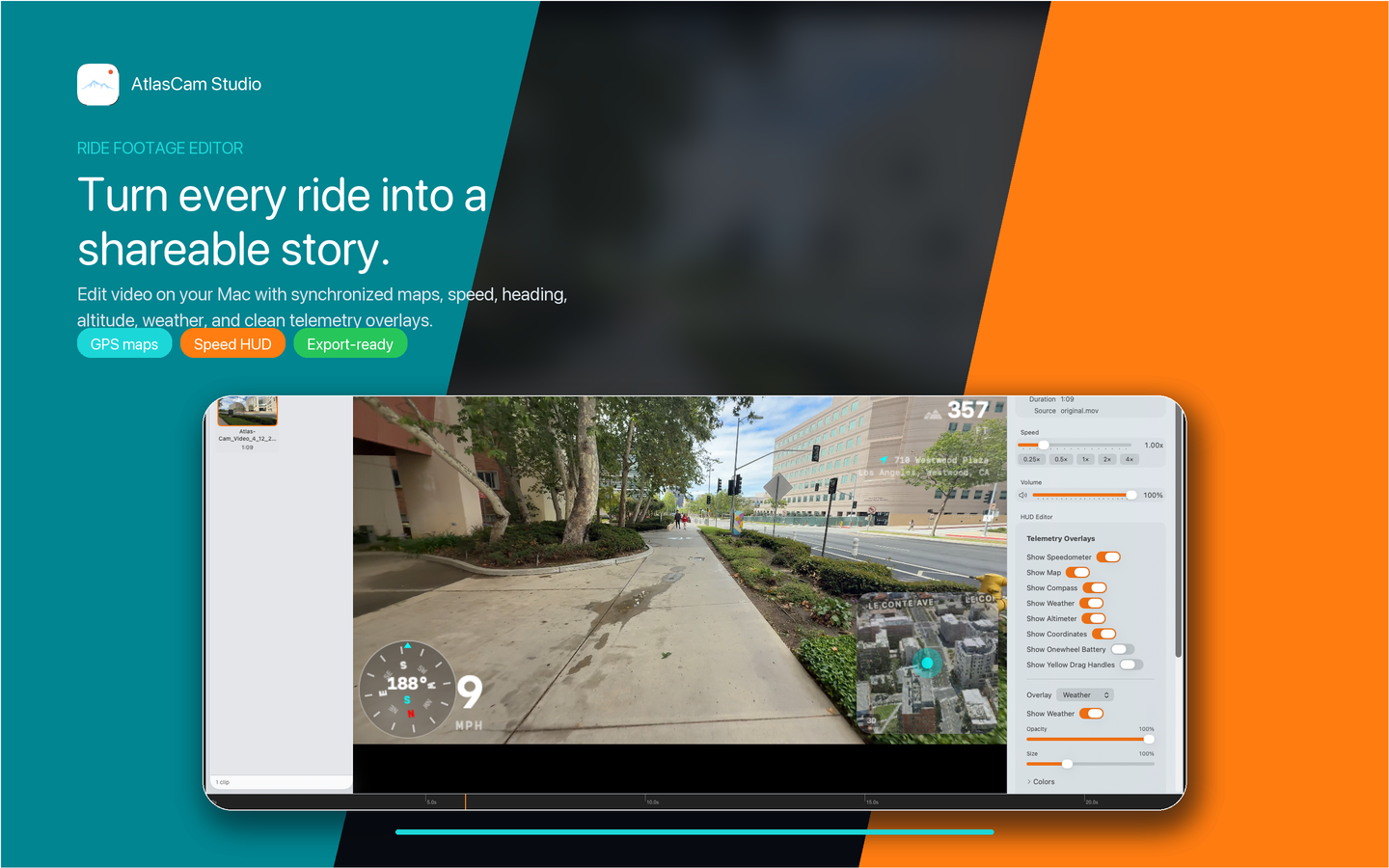
Take your clips to the desktop. AtlasCam Studio is the dedicated Mac companion app for precision timeline editing and multi-minute video rendering.

AtlasCam Studio editing a ride video with telemetry overlays, map, and export controls
πŸŽ›οΈ
macOS

Precision HUD Inspector

Fine-tune every gauge parameter. Toggle individual widgets on or off, adjust opacity, change map styling, and customize typography with instant desktop preview.

  • Control map type, zoom level, and route trail line width
  • Tune speedometer smoothing and units (MPH / KMH)
  • Reposition widgets with pixel-precise inspector coordinates
🎞️
Apple Silicon

Timeline Trimming & Sync

Import .atlascamride packages directly from AirDrop or USB drive. Studio keeps every sensor tick synchronized to your video frames as you trim and splice.

  • Scrub through your run with synchronized map cursor
  • Trim in/out points without losing sensor synchronization
  • High-bitrate ProRes and H.265 export rendering on Apple Silicon
Chapter 09

Pro Tips & Frequently Asked Questions

Practical answers to help you get the most out of every ride and maintain your gear.

πŸ’‘
Pro Tip

How do I save battery on 4-hour rides?

For all-day group rides, switch the capture mode to Telemetry Ride. Put your iPhone in your pocket or backpack with the screen locked. AtlasCam continues logging your GPS path, elevation, and board battery over Bluetooth with minimal power consumption.

🎀
Audio

How do I record clear audio while riding?

Wind noise is the biggest challenge at speed. In Settings > Audio, enable Wind Noise Reduction. For creator-grade audio, pair a wireless Bluetooth lavalier mic (such as DJI Mic 2 or Rode Wireless GO) or helmet communicator inside your helmet chin bar.

πŸ“²
Sharing

Do friends need an app or account to watch my live link?

No! AtlasCam Live watch links (e.g. live.atlascam.app/code) run entirely in standard web browsers on both mobile and desktop. No app download, no account sign-up, and no subscription is required for viewers.

πŸ”’
Privacy

Is an account required to use AtlasCam?

No. AtlasCam does not require any user account or login. Your photos, videos, and GPS routes stay locally on your device unless you choose to export them or initiate an optional live broadcast.

πŸ“Ά
Offline

Does AtlasCam work without cell service?

Yes. GPS logging, video recording, board Bluetooth telemetry, and altimeter readings work completely offline in remote canyons or backcountry trails. Weather and live sports scorebugs update whenever connectivity is restored.

πŸ’Ž
Pro Access

What is included in AtlasCam Pro?

AtlasCam is fully featured for free ride logging and video capture. AtlasCam Pro unlocks clean exports without the watermark, live streaming with watch links, OBS Studio LAN HUD streaming, Multi-Cam dual recording, 3D LiDAR tools, and custom HUD theme packages.

Ready for your next ride?

Download AtlasCam on the App Store and turn your phone into a high-performance telemetry action camera.

Download on the App Store